Approach
Labs
- Microsoft Learn labs: https://microsoftlearning.github.io/AZ-104-MicrosoftAzureAdministrator/
- Interactive labs simulation: https://mslabs.cloudguides.com/guides/AZ-104%20Exam%20Guide%20-%20Microsoft%20Azure%20Administrator
Todo
Networking
Notes on making a vNet
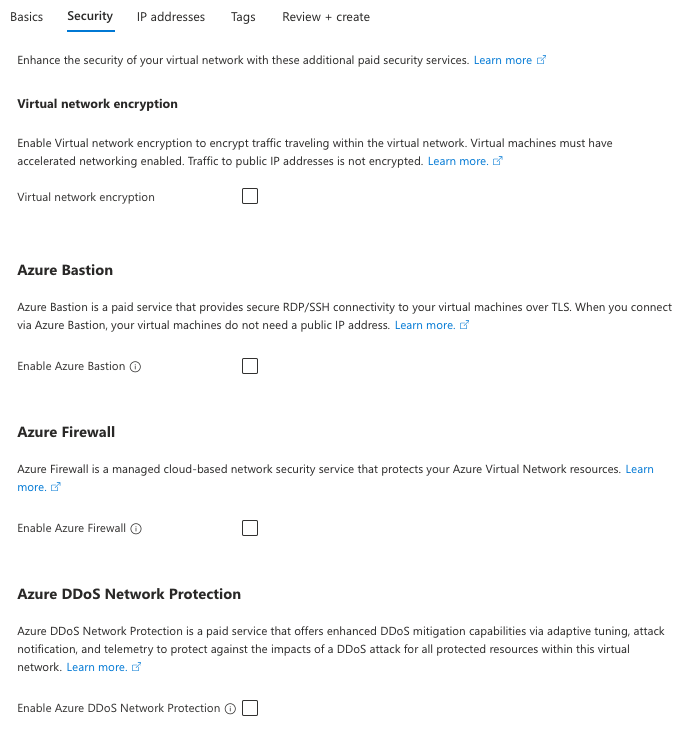
—
- An Azure resource that you connect to the virtual network can be in the same resource group as the virtual network or in a different resource group.
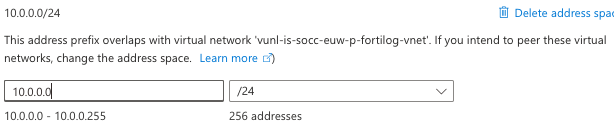
-
virtual-network-encryption: Virtual network encryption enables you to encrypt traffic between Virtual Machines and Virtual Machines Scale Sets within the same virtual network. Virtual network encryption encrypts traffic between regionally and globally peered virtual networks. Virtual machines must have accelerated networking enabled. Traffic to public IP addresses is not encrypted. Azure-Bastion: Azure Bastion is a paid service that provides secure RDP/SSH connectivity to your virtual machines over TLS. When you connect via Azure Bastion, your virtual machines do not need a public IP address.
Notes on peering vNets
Peering vNets: vnet-studie-az-104-joost en vnet-studie-az-104-joost-2
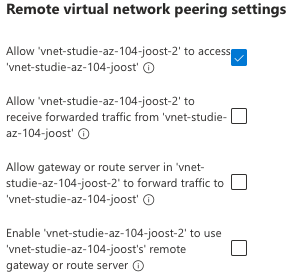
Per bovenstaande opties:
- Allow ‘vnet-studie-az-104-joost-2’ to access ‘vnet-studie-az-104-joost’: Select this option to allow traffic from ‘vnet-studie-az-104-joost-2’ to ‘vnet-studie-az-104-joost’. This setting enables, e.g., communication between hub and spoke in hub-spoke network topology and allows a VM in ‘vnet-studie-az-104-joost-2’ to communicate with a VM in ‘vnet-studie-az-104-joost’.
- Allow ‘vnet-studie-az-104-joost-2’ to receive forwarded traffic from ‘vnet-studie-az-104-joost’: Enabling this option will allow ‘vnet-studie-az-104-joost-2’ to receive traffic from virtual networks peered to ‘vnet-studie-az-104-joost’. For example, if vnet-2 has an NVA that receives traffic from outside of vnet-2 that gets forwards to vnet-1, you can select this setting to allow that traffic to reach vnet-1 from vnet-2. While enabling this capability allows the forwarded traffic through the peering, it doesn’t create any user-defined routes or network virtual appliances. User-defined routes and network virtual appliances are created separately.
- Allow gateway or route server in ‘vnet-studie-az-104-joost-2’ to forward traffic to ‘vnet-studie-az-104-joost’: Enabling this setting will allow ‘vnet-studie-az-104-joost’ to receive traffic from ‘vnet-studie-az-104-joost-2’s’ gateway or route server. In order for this option to be enabled, ‘vnet-studie-az-104-joost-2’ must contain a gateway or route server.
- Enable ‘vnet-studie-az-104-joost-2’ to use ‘vnet-studie-az-104-joost’s’ remote gateway or route server: This option can be enabled only if ‘vnet-studie-az-104-joost’ has a remote gateway or route server and ‘vnet-studie-az-104-joost’ enables “Allow gateway in ‘vnet-studie-az-104-joost’ to forward traffic to ‘vnet-studie-az-104-joost-2’“. This option can be enabled in only one of ‘vnet-studie-az-104-joost-2’s’ peerings.

definitie VPN-gateway: Azure VPN Gateway service can be used to send encrypted traffic between an Azure virtual network and on-premises locations over the public Internet. (…) If you don’t have a subnet named GatewaySubnet, when you create your VPN gateway, it fails.
definitie Azure-route-server: fully managed Azure service that simplifies dynamic routing between network virtual appliances (NVAs) and Azure virtual networks. It enables automatic route exchange through Border Gateway Protocol (BGP) between NVAs and the Azure Software Defined Network (SDN), eliminating the need for manual route table configuration and maintenance
definitie Network-Virtual-Appliance NVA: virtual appliances (resources) that provide networking functionality similar to phsyical network appliances from major brands (Cisco, Citrix, F5, Fortinet, etc.)
definitie Azure-virtual-network-service-endpoints: Azure virtual network service endpoints provide secure and direct connectivity to Azure services over an optimized route through the Azure backbone network. These endpoints allow you to secure critical Azure service resources exclusively to your virtual networks, enabling private IP addresses to reach Azure services without requiring public IP addresses. (…) Microsoft recommends use of Azure Private Link and private endpoints for secure and private access to services hosted on the Azure platform. Azure Private Link deploys a network interface into a virtual network of your choosing for Azure services.
eigenschap Azure-Bastion: Bastion uses your browser to connect to VMs in your virtual network over Secure Shell (SSH) or Remote Desktop Protocol (RDP) by using their private IP addresses. The VMs don’t need public IP addresses, client software, or special configuration.